
JELU DIGITAL
I’m Jen, the person behind Jelu Digital. I design websites and sales funnels, and build GoHighLevel automations. I care about how your business is presented and how people move through it..
06+
WEBSITES
08+
SERVICES
98%
Client Satisfaction
I build long-term partnerships through proven results.

Hi, I’m Jenelyn Luca Baldoza The person behind Jelu Digital.
Jelu Digital is the name I work under, where I bring together my skills in professional website design, GoHighLevel (GHL) automation, and virtual assistance to help businesses build a stronger online presence and manage their daily operations more efficiently.
As a web designer, I create responsive, thoughtfully designed websites and landing pages that reflect each business’s identity, communicate its services clearly, and make it easier for customers to take action. Beyond design, I work with GHL automations, including CRM workflows, lead management, appointment scheduling, customer follow-ups, and processes that help businesses stay connected with their customers.
I also provide Virtual assistance, supporting businesses with administrative tasks, email and calendar management, online research, data organization, chat support, and everyday operational needs.
I believe good work starts with understanding the people behind the business. Every project has its own goals, challenges, and priorities. I take the time to listen, communicate openly, and find practical solutions that make a real difference.
I’m continuously developing my skills, exploring better tools, and improving the way I work. I approach each project with care, honesty, and a commitment to delivering something useful, reliable, and tailored to the business I’m working with.



Concepts each with its own character.
I made these concept websites to explore how different businesses could present themselves. Each one gave me a different mood and audience to think about. The videos show the pages in motion, so you can see how the design choices sit together.
01 /
BABY CLOTHING SHOP
For Sunloom, I kept thinking about how a baby clothing brand could welcome someone. The soft palette, quiet type, and breathing room let the products carry the feeling of the page.
02 /
MARKETING AGENCY
With Offscript, I explored the energy of a marketing studio. The color and typography carry that personality, while the sections give the offer a readable structure.
03 /
REAL ESTATE
I let the home do much of the talking in this property concept. Large imagery and open spacing give visitors room to take it in, with a visible route to an inquiry.
04 /
SEAFOOD RESTAURANT
Brine & Ember let me explore the atmosphere of a seafood restaurant through coastal tones and food imagery. I gave the visuals space and arranged the content around the setting and menu.
05 /
FLORIST SERVICES
Flora Forge was a chance to explore a bolder personality. I paired expressive type and rich color with large floral imagery, giving the arrangements a central place in the design.
05 /
CLEANING SERVICES
I wanted this cleaning-service concept to feel like an organized first introduction. Separate service sections and a calm palette give the information a welcoming setting.
Working together should feel straightforward
Listen for what matters
You know your business in a way I’m still getting to know. I ask about the people you serve, the materials you already have, and the problem you want the project to address.
Make room for your input
I want you to feel comfortable asking a question or saying that something doesn’t fit. I explain my choices and use your feedback to understand where the work needs adjusting.
Talk through changes
If the requirements shift, I prefer to pause and talk through the effect on the work. It helps us make decisions with the scope, timing, and priorities in view.
What happens after someone responds?
These real samples show the choices behind a follow-up: when to wait, what a reply changes, and where the team should be involved. Open an image to look at the paths I’ve put together for booking support, reactivation, and review requests.
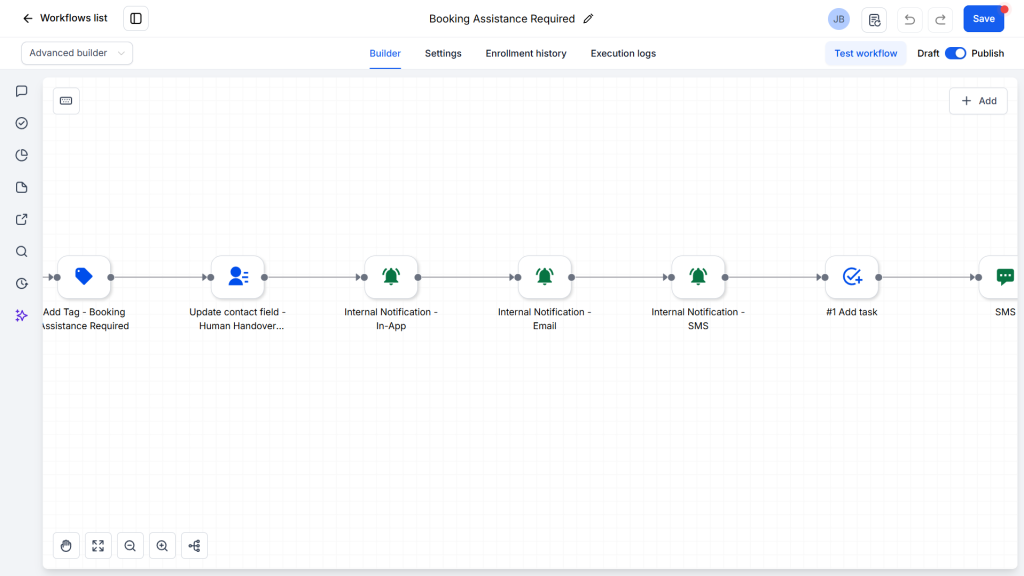
01 / HUMAN HANDOFF
Booking assistance
I built this sample around the moment a booking question needs a person. It marks the contact for support, updates the handoff field, alerts the team, and creates a task, with SMS and email steps alongside it.
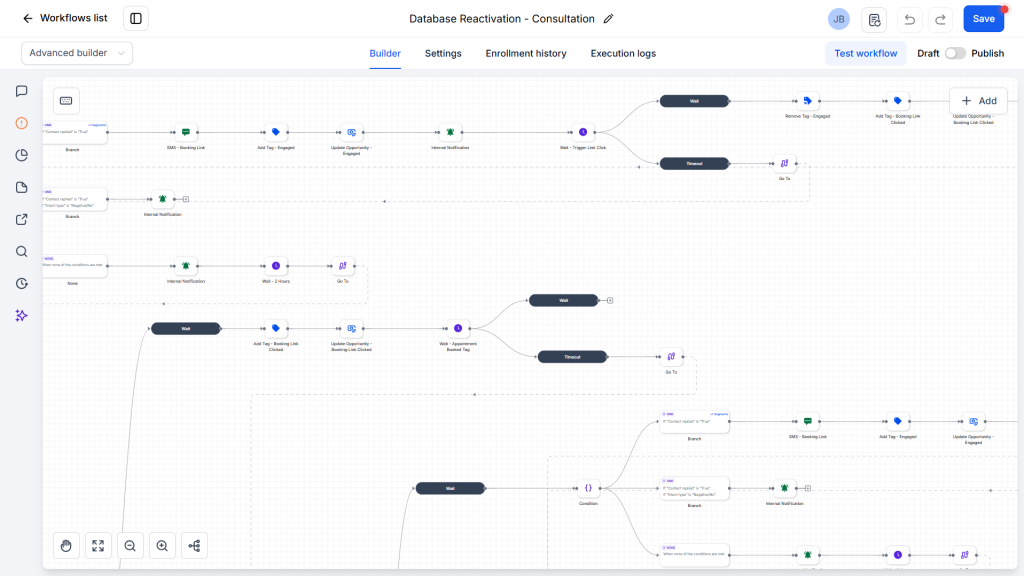
02 / DATABASE REACTIVATION
Consultation reactivation
Here, the contact’s response changes the direction. I used separate paths for replies and booking-link clicks, with tags and opportunity updates to record engagement and waits to organize the follow-up.
03 / APPOINTMENT FOLLOW-UP
Emergency appointment reactivation
This appointment sample gave me a more detailed sequence to map out. Email, SMS, booking-link actions, and response checks lead into different paths, with timed waits and internal alerts along the way.
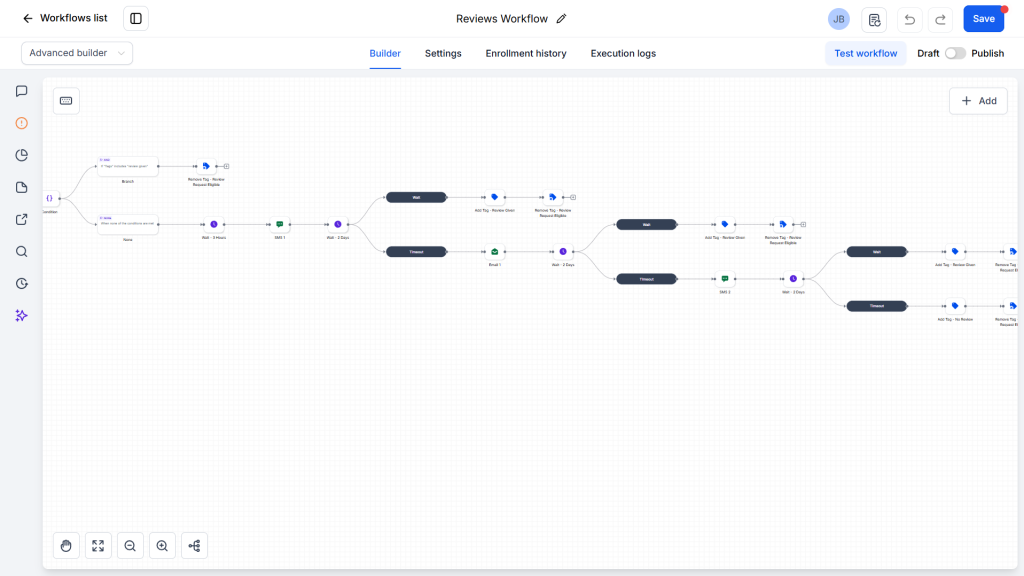
04 / REVIEW REQUESTS
Review follow-up
For this review sample, I spaced the SMS and email reminders with waits. Review-status checks and tag changes create a way for a recorded review to leave the request sequence.
A plan we can work from.
I made these concept websites to explore how different businesses could present themselves. Each one gave me a different mood and audience to think about. The videos show the pages in motion, so you can see how the design choices sit together.
1. Share the starting point
We look at your goal, content, brand materials, and any existing pages or workflows. That gives us a starting point and shows what still needs to be prepared.
2. Agree on what’s included
We outline the pages or workflow steps, timing, and review points. A shared outline makes it easier to see what the work covers and where a separate request would begin.
3. Review a working version
I build a draft you can look through. This is where we review the wording, layout, page flow, or response paths and identify the changes that matter.
4. Refine and hand over
The final review covers the agreed pages or workflow paths and the refinements within scope. Handover notes are shaped around the platform and what you need to use the work.
What would you like to build?
01 /
Website Design
Your website should feel like your business. I shape the layout and visual details around what you want people to understand, with space for your story, services, and contact information.
- Desktop, tablet, and phone layouts
- Type and color suited to your brand
- About, service, and contact pages
- Portfolios and project galleries
- Readable sections and navigation
- Animation where it fits the design
At handover
The agreed pages, responsive layouts, and notes for your chosen platform.
02 /
Virtual Assistant Services
I help business owners stay organized and manage everyday tasks so they can focus on running and growing their business. From administrative support to online research and customer communication, I provide reliable assistance based on what each business needs.
Email and inbox management
Calendar management and appointment scheduling
- Chat Support
Data entry and spreadsheet organization
Online research and information gathering
Customer inquiries and follow-ups
File and document organization
Website updates and content management
General administrative and online business support
At handover
Organized files, updated records, completed tasks, and a clear summary of the work done.
03 /
GoHighLevel Automation
A useful automation starts with the conversation it’s meant to support. I build GoHighLevel workflows around replies, bookings, and follow-ups, with conditions and team notifications for the moments that need a person.
- Contact tags and field updates
- SMS and email follow-up sequences
- Booking support and team notifications
- Database reactivation workflows
- Review requests and status checks
- Wait steps and response branches
At handover
The agreed workflow paths, checks, and notes explaining the structure.
A few practical questions.
I can help with everyday business tasks such as email and calendar management, appointment scheduling, more chat support, data entry, online research, customer inquiries, file organization, and website updates. My goal is to take repetitive tasks off your hands so you can focus on running your business.
Tell me what your business does and what you’d like to create or change. A page link, existing content, or a few references can help me understand the idea. It’s okay if some details are still undecided.
Share the current website or funnel and the part you want to improve. I’ll need to look at the platform, available access, and existing setup before discussing the work involved.
I find specific comments helpful: a headline you want to change, a section that feels crowded, or a workflow response that needs another path. We agree on review points and included revisions as part of the scope.
Timing depends on the number of pages or workflow steps, content readiness, platform requirements, and time for review. We consider those details when agreeing on a schedule.
These examples show a range of styles and workflow structures. Your project can have its own direction. Send the references or requirements you have, and we can discuss how they fit the project.
The six website videos are concept projects, the four GoHighLevel images are workflow samples, and the live funnel is an illustrative design example. They show the work and its structure, without claiming client results.
That depends on the platform and setup. We can include editable content areas and a short guide in the agreed scope. Tell me which parts you want to manage.
We agree on any handover help or ongoing support before the project starts, so you know what is included and what would be a separate request.
Absolutely! You don’t need to commit to full-time assistance. Whether you need help with a one-time project, a few hours of administrative support, or ongoing assistance, we can discuss your needs and arrange a schedule that works for both of us.
Have an idea? I’d like to hear it.
Tell me a little about your business and what you’d like to change or create. A short message is a good place to start; you don’t need to have every detail worked out.